> For the complete documentation index, see [llms.txt](https://guide.ucall.vn/llms.txt). Markdown versions of documentation pages are available by appending `.md` to page URLs; this page is available as [Markdown](https://guide.ucall.vn/chien-dich-callbot-ai-auto-call/xay-dung-chien-dich/buoc-4-kiem-tra-va-chay-chien-dich.md).
# Bước 4: Kiểm tra và chạy chiến dịch
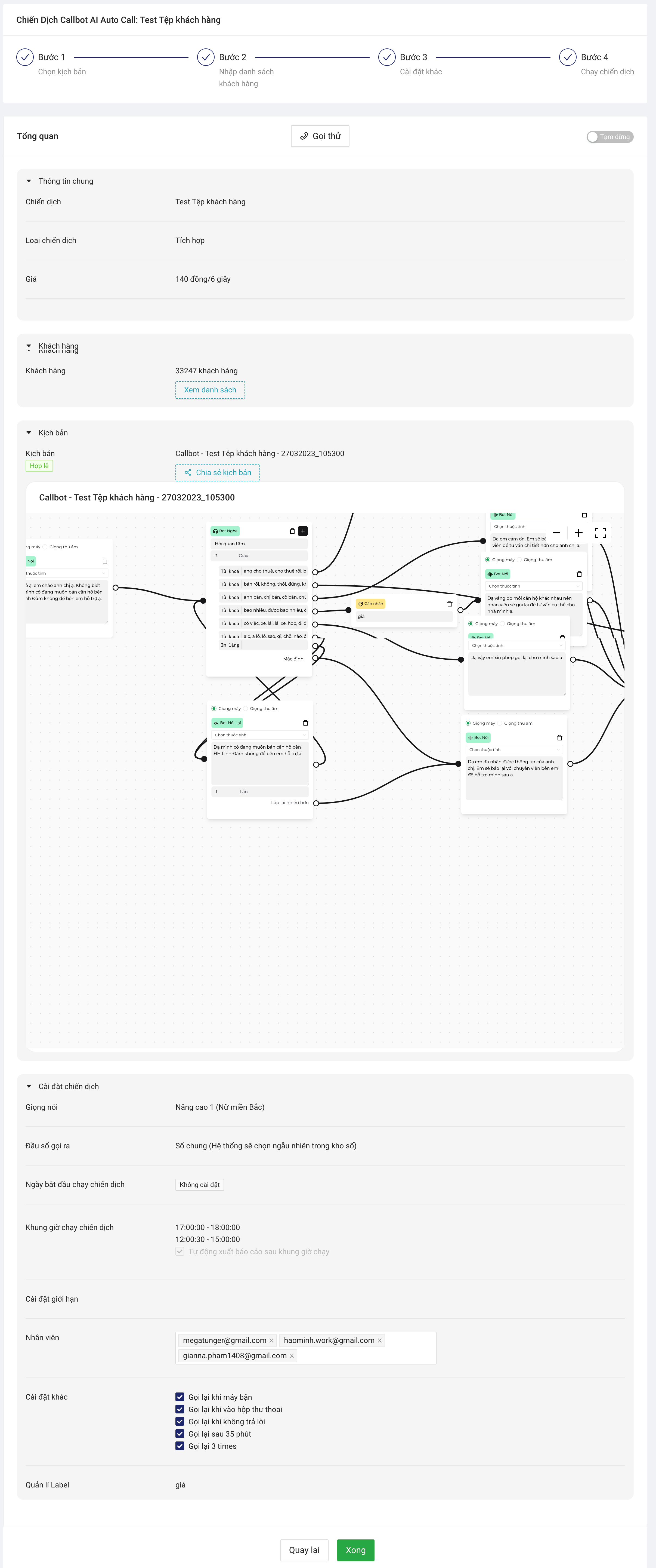
Sau khi đã cài đặt xong hết các thông tin của chiến dịch. Bạn hãy kiểm tra lại các thông tin một lần nữa, tạo cuộc gọi demo để chắc chắn kịch bản đã phù hợp rồi chạy chiến dịch.
Kiểm tra và chạy chiến dịch
Kiểm tra lại các thông tin của chiến dịch đã cài đặt để chắc chắn các thông tin đã chính xác.
Kiểm tra lại cài đặt chiến dịch trước khi gọi thử
Bạn có thể bấm gọi thử để có thể tiến hành gọi thử cuộc gọi mẫu xem các thông tin cài đặt đã phù hợp hay chưa.
Gọi thử để kiểm tra kịch bản và các phần cài đặt đã phù hợp hay chưa
Sau khi đã gọi thử
* Nếu kịch bản chưa phù hợp, bạn quay lại bước 1 để sửa kịch bản.
* Nếu kịch bản đã phù hợp, bấm chạy chiến dịch để thực hiện chạy chiến dịch của bạn. Khi đó, nhiều cuộc gọi sẽ được thực hiện đồng thời trong chiến dịch của bạn.